
The D IN/PPS port on VBOX Touch can be used to connect to a VBOX Brake Pedal Trigger when performing brake trigger deceleration tests.
IMPORTANT
You must use the external antenna when conducting brake trigger tests.
Deceleration tests on VBOX Touch require configuration before use.
Before starting a session:
Open the Deceleration Settings to configure the trigger test.
Select Trigger as your Test Type.
The Trigger Settings become available on the right-hand side of the screen.

You can configure the following for Trigger Tests:
- Minimum Trigger Speed
- MFDD
- Alert at End
A Trigger test will start once a Minimum Trigger Speed is met and a VBOX Brake Pedal Trigger is activated. The test will stop once the vehicle is stationary (below 2.5 km/h).
With Trigger selected as the test type, 'TRIGGER' will be used as the test header and will be displayed at the top right corner of the Decel Mode screen. When the trigger is activated, 'ON' will be displayed next to the header.
You can view a history of the test results by selecting the Results button at the bottom of the screen. The test results will be displayed until you choose a new test type or press the Reset button.
Tests will be displayed in chronological order and the fastest will be highlighted. To scroll through the results, use the scroll bar on the right-hand side of the screen.
Each new session will have a separate header, displaying the time and date for the first completed test in that session.
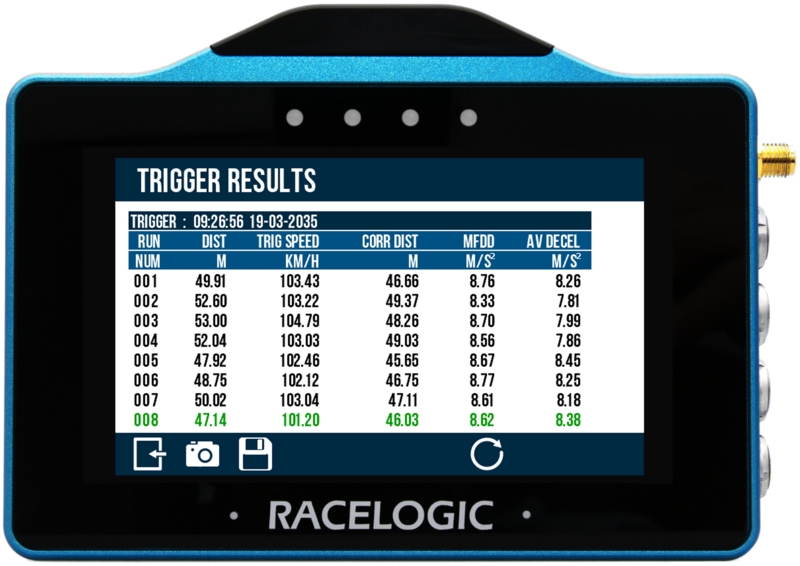
Information includes:
Header
- Test type
- Time of first completed run in session
- Date of first completed run in session
Trigger Decel Test:
- Test run number
- Test completion distance (km/h or mph)
- Speed at trigger event (km/h or mph)
- Corrected trigger test distance (m or ft)
- Mean fully developed deceleration (MFDD) (g or m/s²)
- Average deceleration achieved during test run (g or m/s²)
Return to the main screen by selecting the Exit Button at the bottom left of the screen.