
VBOX 4 comes equipped with a Bluetooth radio that lets you configure the VBOX unit remotely, along with the remote output of real-time VBOX serial data at the full 100 Hz data rate, to any Bluetooth-capable PC or data logger.
VBOX 4 will connect to the computer via SPP (serial port profile). You can do this as a secured or unsecured connection.
- Open the Bluetooth settings on your computer/tablet.
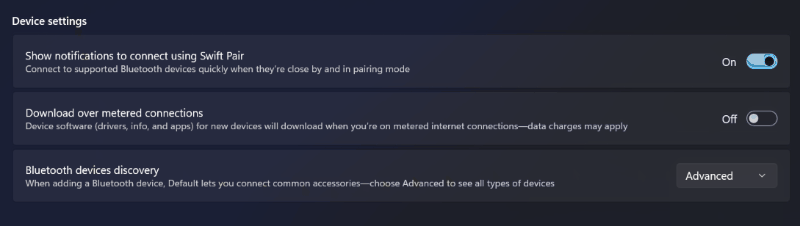
Note: If you are using Windows 11, you must make sure that the Bluetooth devices discovery setting is set to Advanced for the VBOX unit to be discoverable.
Go to Settings → Bluetooth & devices → View more devices → Device settings → Bluetooth devices discovery.
- Add a device.
- Select your VBOX 4 unit from the list of available devices.
It will be named VB4 s/n :0XXXXX, where XXXXX is the serial number on your unit.
- If you are using a secured connection you must enter the pairing code: 1234
- When the unit has paired to your computer/tablet, open VBOX Setup.
- Select the relevant COM port from the Port dropdown menu.

- Click Connect.